
回答
How to change your email notification settings
[Where to Change the Settings]
- On Coincheck (Web) , select the "Settings" (gear) icon in the menu, then select "Settings".
- On the Coincheck app, select "Wallet" > the "Account" (person-shaped) icon, then select "Change Basic Settings".
Instructions for Coincheck (Web)
1. Settings
Select the gear icon from the menu on the screen and click or tap "Settings".
2. Change Settings from E-mail alert setting
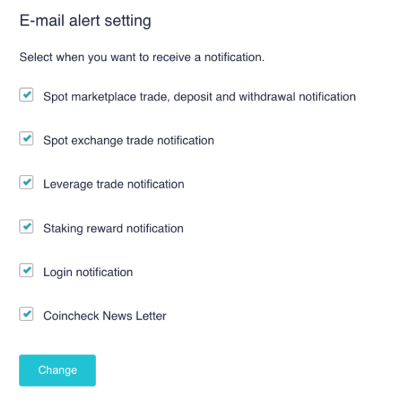
You can choose whether to receive the following six types of emails:
If you uncheck the box and click or tap "Change", the target emails will no longer be sent by the system.
If you check the box and click or tap "Change", sending will resume.
1) Spot marketplace trade, deposit and withdrawal notification
- These are emails sent when you buy or sell cryptocurrency (spot), or when you deposit or withdraw Japanese Yen.
2) Spot exchange trade notification
- These are emails sent when an exchange trade (a spot buy or sell order) is executed.
3) Leverage trade notification
- These are emails sent when a leverage trade (a buy or sell order with leverage) is executed.
4) Staking reward notification
- These are emails notifying you that a staking reward has been granted.
5) Login notification
- These are emails sent when you log in to Coincheck.
6) Coincheck News Letter
- This is an irregularly sent email magazine from Coincheck.
Important Notes
- These settings are for important notifications and announcements regarding your use of Coincheck, so please consider carefully before choosing whether to receive them.
- If you choose not to receive notifications, please refer to the announcements published on our corporate website or the information posted on our official X (formerly Twitter) account.
- Changes to settings may take some time to take effect, so you might still receive emails even after setting them not to be received. In such cases, please wait for a while.
Instructions for the
Coincheck app
1. Settings
Tap "Wallet" at the bottom of the screen, then sequentially tap the "Account" icon at the top right of the screen, and finally tap "Change Basic Settings".
2. Change Settings from Email Reception Settings
You can choose whether to receive the following six types of emails:
If you uncheck the box and tap "Change", the target emails will no longer be sent by the system.
If you check the box and tap "Change", sending will resume.
1) Spot marketplace trade, deposit and withdrawal notification
- These are emails sent when you buy or sell cryptocurrency (spot), or when you deposit or withdraw Japanese Yen.
2) Spot exchange trade notification
- These are emails sent when an exchange trade (a buy or sell order) is executed.
3) Leverage trade notification
- These are emails sent when a leverage trade (a buy or sell order with leverage) is executed.
4) Staking reward notification
- These are emails notifying you that a staking reward has been granted.
5) Login notification
- These are emails sent when you log in to Coincheck.
6) Coincheck News Letter
- This is an irregularly sent email magazine from Coincheck.
Important Notes
- These settings are for important notifications and announcements regarding your use of Coincheck, so please consider carefully before choosing whether to receive them.
- If you choose not to receive notifications, please refer to the announcements published on our corporate website or the information posted on our official X (formerly Twitter) account.
- Changes to settings may take some time to take effect, so you might still receive emails even after setting them not to be received. In such cases, please wait for a while.